Public Demo Site

Field-Placement Application for seamless operation

Turanto turns the department's placement, documentation, hours, supervision, evaluation, compliance, reporting, retention, and communication needs into a governed application model that can be demonstrated and configured for CNU.

Built from the requirements email and the FieldPlacementV123 Turanto model — not a generic brochure page.

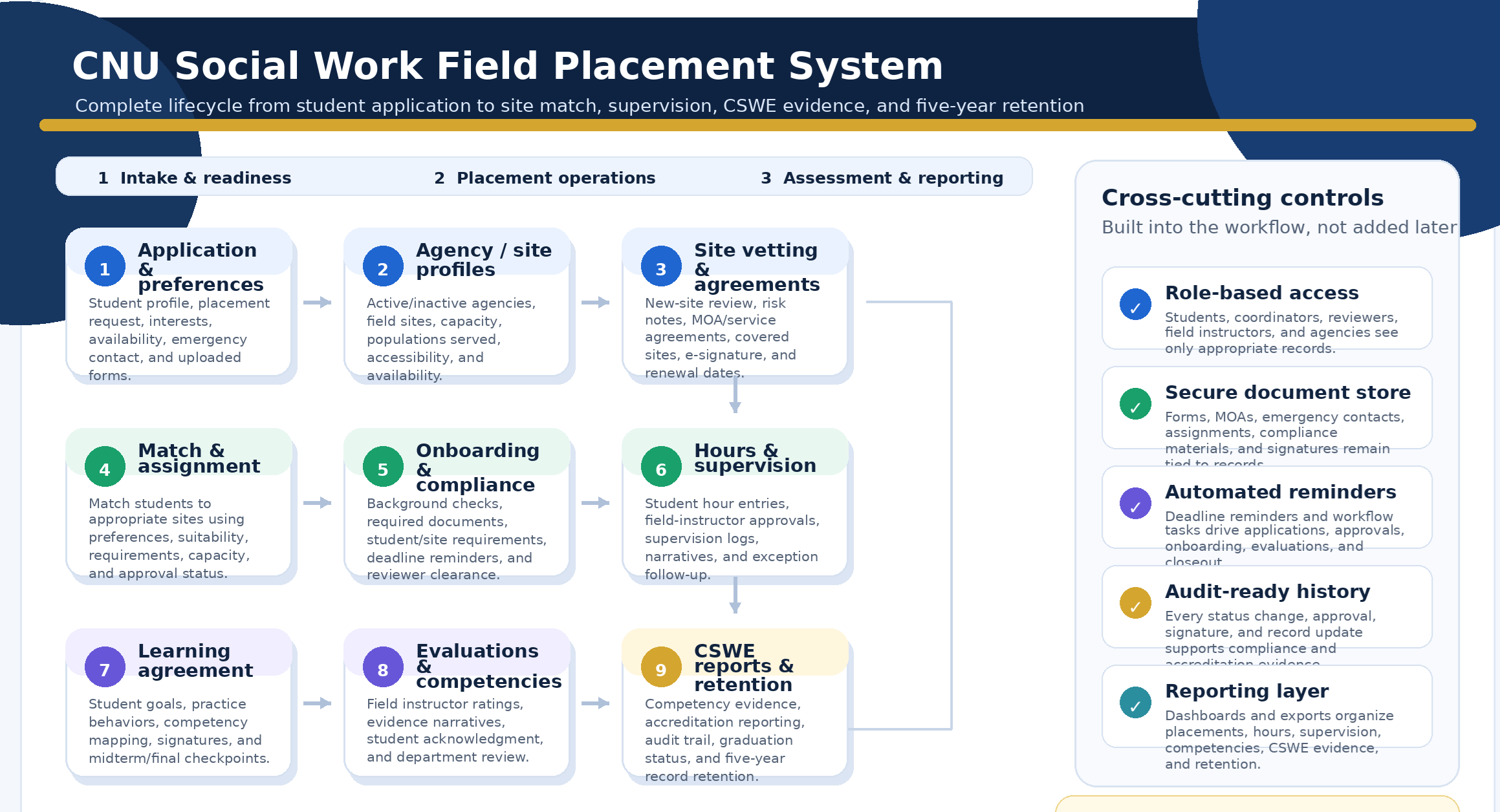
Field placement lifecycle diagram
105domain entities in the Stage 6 model
5high-value demo stories
7CNU requirement areas covered
1auditable system of record
Five demo stories

Capabilities mapped to CNU's requirement areas

The site highlights the five user journeys most likely to matter in a first review: student readiness, placement matching, hours and supervision, compliance clearance, and CSWE evidence.

01Placement intake

Student applies and tracks readiness

Students submit placement applications, preferences, emergency contacts, onboarding forms, assignments, acknowledgments, and signatures in one guided record instead of scattered email attachments.

  • Placement applications
  • Site preferences
  • Emergency contacts
  • Student assignments
  • Readiness status
02Placement logistics

Coordinator matches students to approved sites

Field education staff can compare student needs against agency status, site capacity, population served, suitability, onboarding requirements, agreements, and availability.

  • Agency and site status
  • Site vetting
  • Capacity tracking
  • Student-site match
  • Agreement coverage
03Field work tracking

Field instructor approves hours and supervision

Students log hours and field instructors review, approve, reject, or request corrections while maintaining supervision logs connected to the placement record.

  • Field hour entries
  • Approval queue
  • Supervision logs
  • Instructor assignments
  • Progress visibility
04Compliance and audit

Compliance reviewer clears placement requirements

Compliance staff can review background checks, onboarding completion, required documents, electronic signatures, and audit history before students begin or continue placement.

  • Background checks
  • Compliance records
  • Document workflow
  • E-signatures
  • Audit events
05Accreditation reporting

Program director generates CSWE-ready evidence

Evaluation ratings, competencies, learning agreements, accreditation standards, and placement evidence are structured for repeatable CSWE reporting instead of manual spreadsheet assembly.

  • Competency tracking
  • Learning agreements
  • Evaluations
  • Accreditation reports
  • Retention records
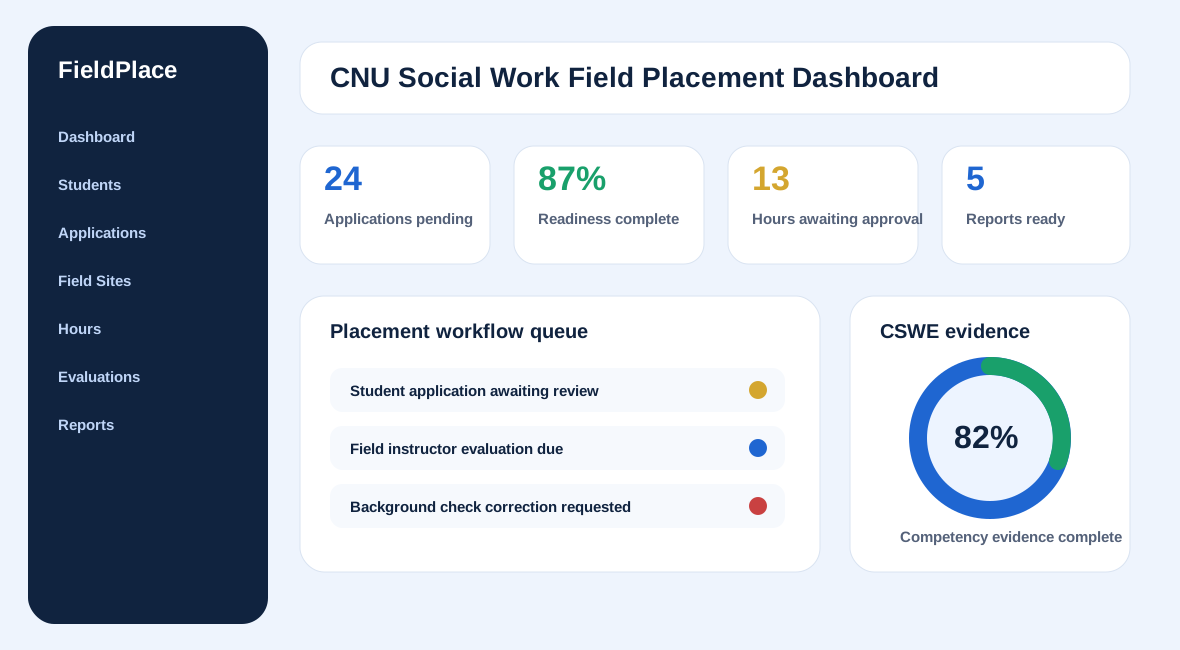
Demo application preview

Turanto demo instance

Placeholder preview of the CNU field placement dashboard
Awaiting live demo URL

Read-only demo iframe placeholder

The page is ready to embed the deployed Turanto instance. Update config.js once the demo URL and guest token are available.

Stage 6 model backbone

A field-placement system of record, not just a form portal.

The FieldPlacementV123 model organizes students, agencies, sites, applications, hours, supervision, evaluations, competencies, documents, signatures, reminders, communications, and retention into connected records.

StudentPlacement ApplicationField SiteSite VettingPlacementField Hour EntrySupervision LogLearning AgreementEvaluationCompetencyCompliance RecordBackground CheckAccreditation ReportRetention RecordCommunicationElectronic SignatureDeadline Reminder
How it was built

From requirements to reviewable demo

Stage 10 turns the capture work into a public-facing demo page that can be deployed to a proposal subdomain and used in discovery with CNU stakeholders.

01

Requirements captured

The CNU email was translated into a structured scope covering placement logistics, documentation, hours, supervision, evaluations, compliance, CSWE reporting, retention, and communications.

02

Model aligned

The FieldPlacementV123 Stage 6 model supplies the core entities, relationships, role views, document records, workflow tasks, reminders, signatures, and reporting objects needed for the demo.

03

Demo and site packaged

This Stage 10 site packages the public story, iframe demo container, capability cards, and implementation path for a quick CNU review and follow-up meeting.

Use-case appendix highlights

What each user sees when action is needed

These cards summarize the Stage 9 role flows and make the website easier to scan during a first conversation.

Student

Signal: Application due / onboarding incomplete

Submit application, upload documents, log hours, acknowledge evaluations.

Field Education Coordinator

Signal: Students awaiting match / placements not ready

Review applications, match students, route approvals, monitor readiness.

Field Instructor

Signal: Hours awaiting approval / evaluation due

Approve hours, submit supervision logs, complete competency evaluations.

Compliance Reviewer

Signal: Background checks pending / compliance items awaiting review

Clear requirements, request corrections, preserve audit evidence.

Program Director

Signal: CSWE report period / missing competency evidence

Review competency rollups, identify gaps, generate accreditation reports.

Recommended next conversation

Bring one real workflow, one current form set, and one reporting need.

eTelic can walk CNU through the demo, validate terminology, confirm security and procurement constraints, and identify the fastest pilot scope.